Six months ago, I started using an app on my phone called Minimalist Phone – Launcher. The core idea behind it is to limit the visual output of my phone’s user interface so it stays practical without adding unnecessary clutter to something I use to navigate my day-to-day life. Overall, I can say I’ve really been liking it. That said, I don’t think it’s for everyone, so I wanted to go over some pros and cons.
Who This App Is Not For
I don’t think this is a good solution for someone who finds a lot of satisfaction in the look of their phone. If you enjoy custom backgrounds, special themes, widgets, etc., I don’t think you’re going to enjoy this app.
If you don’t like learning new interfaces, figuring out where settings live, or learning how to toggle the launcher off when needed, this app is probably not for you. In my opinion, you’ll find it more stressful than just dealing with the extra visual clutter.
How the Launcher Works
The app is designed to lay over whatever user interface you already have. On Android, it “covers” the standard Google visuals and creates a much simpler interface. The same goes for the iPhone version.
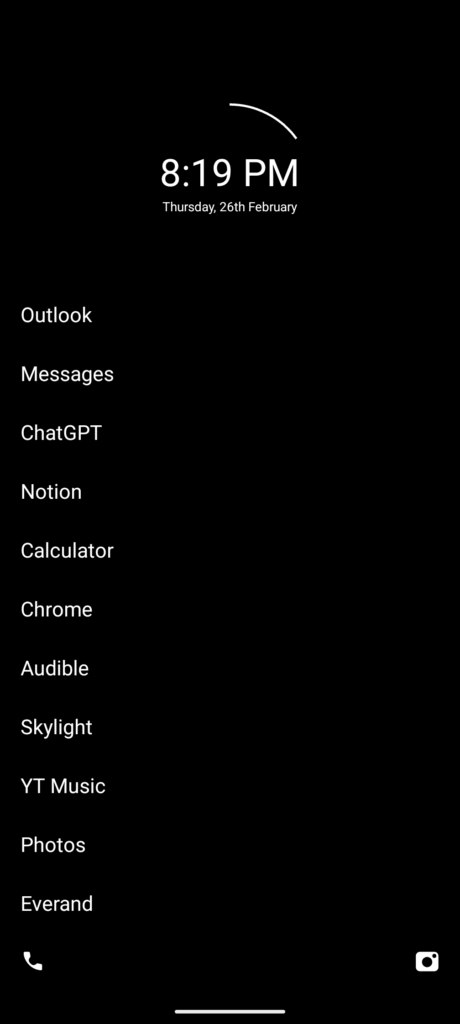
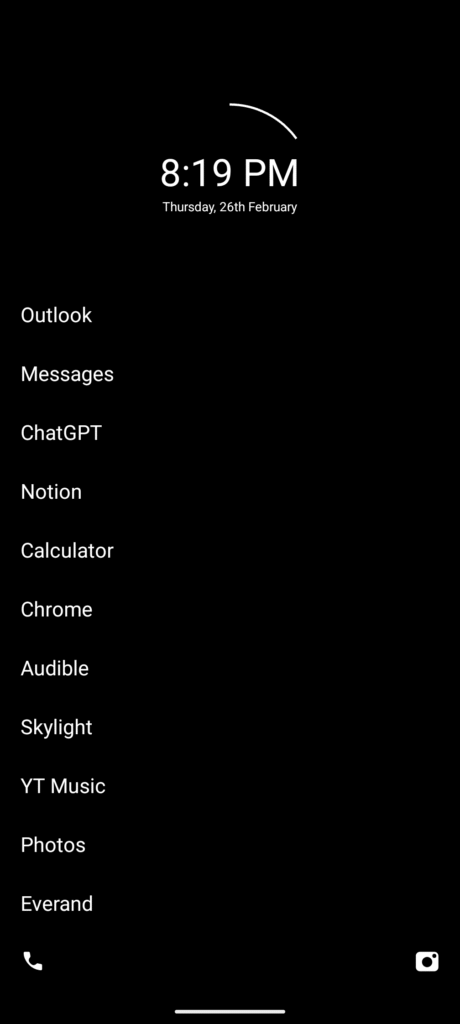
Once the app is turned on, your home screen becomes a solid black background with basic information like the date, time, and battery life. You can then add apps to your Favorites. Anything in Favorites appears on the home screen in a simple list format.
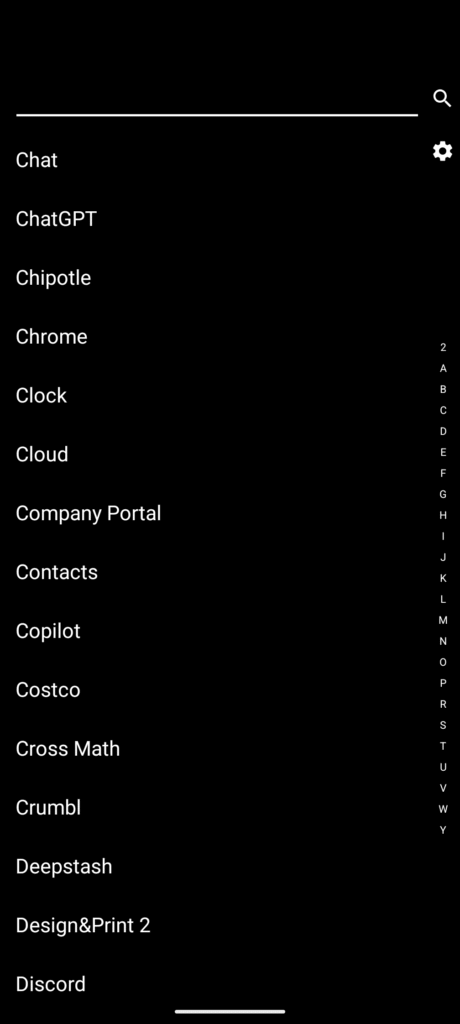
I’m still able to keep my lock screen wallpaper, but the traditional home screen wallpaper is replaced with a black screen and white text. To find other apps, I swipe to the right to see my full app list, just a list with no icons. I rely heavily on the search feature there to quickly find what I need.
Adjusting to Apps Without Icons
One of the biggest adjustments is that apps are displayed by name rather than by icon. This can be tricky at first. There were a few apps where I didn’t even know the actual name, so I had to go into the Play Store to look them up in order to find them in my app list.
I use fewer than 20 apps regularly, so I only had to do this a handful of times. For example, both the Microsoft Authenticator and Google Authenticator apps are simply called “Authenticator,” so I had to open each one to figure out which was which. Thankfully, the app allows you to rename apps, which helps avoid this issue going forward.
Why I Like the Interface
There is a learning curve, but I’ve found a lot of benefits once you get past it. It makes my phone boring, more efficient, and gives me tools to control how much time I spend in apps I don’t want to overuse.
Because of the Favorites list, I rarely need to bounce between multiple app pages. I keep my top 12 apps on the home screen, and anything else requires a deliberate search. I’m not sure if there’s an official limit on favorites, but I find that more than 10–12 starts to reduce efficiency. This setup helps me get on my phone, do what I need to do, and get back off.
Notification Management
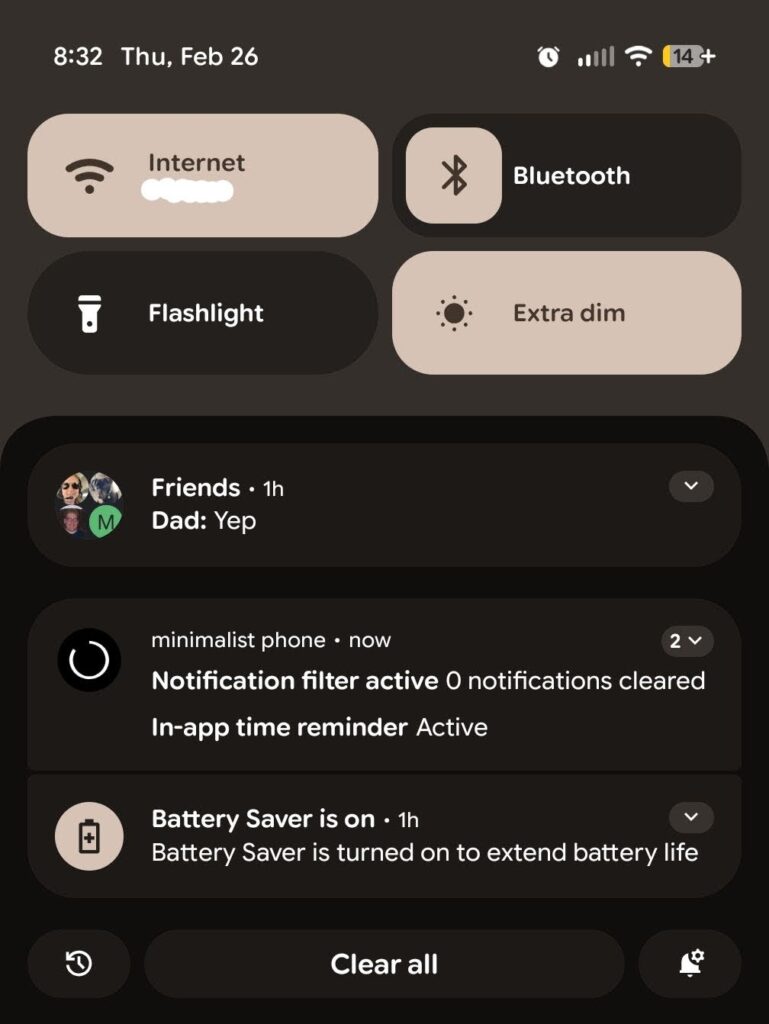
The notification system is intentionally aggressive, and I like that. I’ve allowed 16 apps to show notifications at the top of my screen. Everything else gets sent to a “Filtered” notification bucket.
I treat that bucket as spam and only open it to clear things out. I don’t need to scroll through it, everything lands there and can be cleared with a single button, similar to emptying a recycling bin on a PC.
App Usage Controls (The Main Reason I Downloaded It)
The main reason I downloaded the app in the first place was for the application controls, specifically to limit time spent in social apps like TikTok, Instagram, and Facebook. There are several ways to use these controls, but I mainly use them in two ways.
Hiding Apps
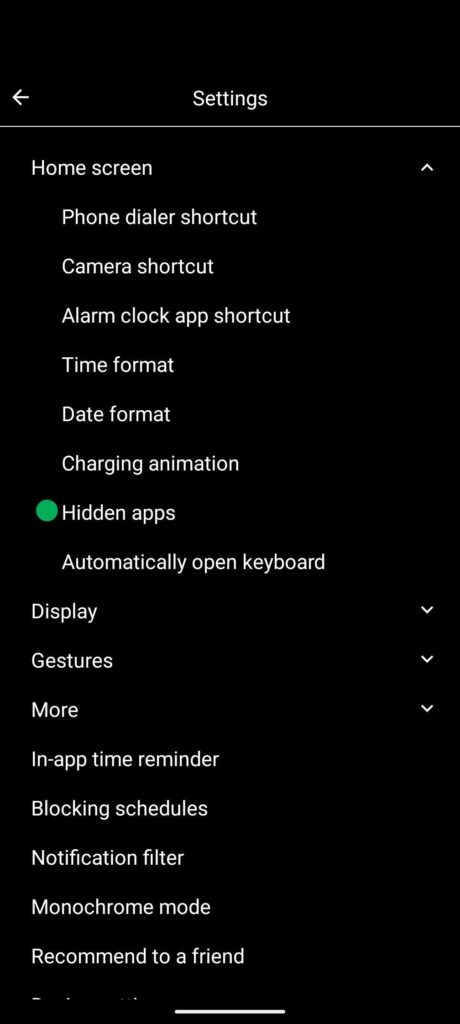
I’ve chosen to hide TikTok entirely. This means that when I swipe to view all my apps, TikTok doesn’t appear in the list and can’t be found via search. To open it, I have to go into Settings, select Hidden Apps, and launch it from there.
Those extra steps act as a reminder that I don’t want to be opening the app frequently.
Time Limits and Mindful Delays
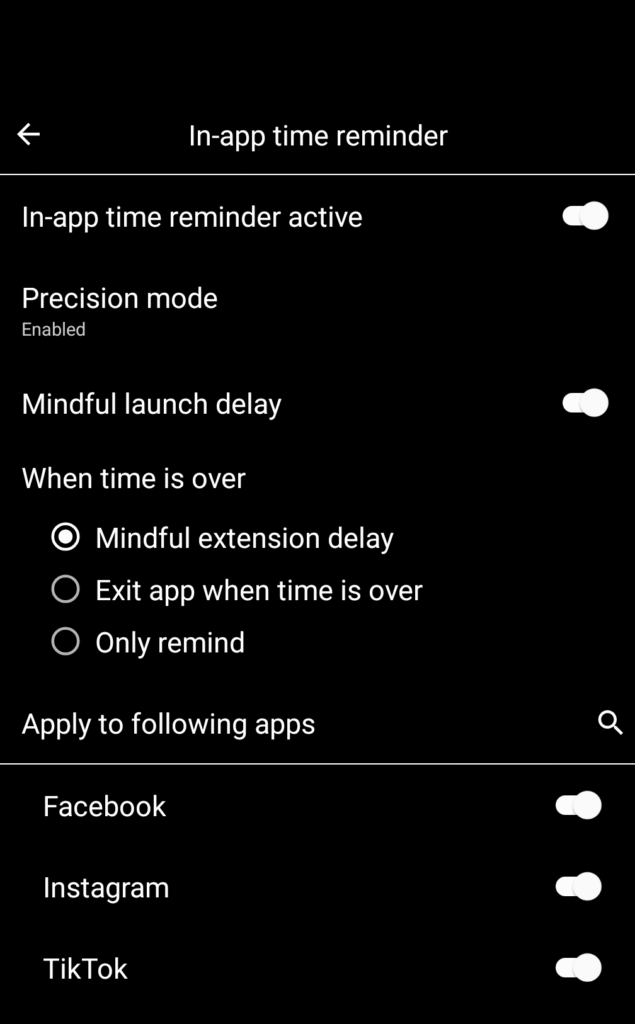
For my other social apps, I use time limits. When I open an app, it triggers a “Mindful Launch Delay” of 15 or 30 seconds before the app opens. Once it does, a timer runs in the background. Mine is set to 10 minutes.
When the timer runs out, I get another countdown and have to choose whether to close the app or extend my time. If I force close, the app shuts immediately. If I choose extra time, I have to wait for the countdown to finish before continuing, and the cycle repeats.
How This Actually Changed My Behavior
These controls aren’t meant to make my life harder or make me feel bad for using apps. They create a deliberate hurdle. To use social apps, I have to consciously decide that I want to spend time there.
I can’t count how many times I’ve opened an app, seen the countdown, and immediately closed it once I realized I was about to mindlessly scroll. The time I get back from that is significant.
There are times when I adjust these controls. For example, I do enjoy TikTok, but I also know how easily I can get addicted to it. If I notice I’m accessing it too often through Hidden Apps, I’ll add time controls on top of that. The shift from having no time limits to having them is jarring, but that’s kind of the point.
Writing this has made me realize I should probably turn Mindful Delay back on for TikTok, at least for a bit, to help break the habit. The opposite can be true as well, though. When I first started using the Minimalist Phone app, about a week in, I was going through something very stressful. I made the decision to turn off the restrictions temporarily to give my brain some space to decompress with social media while I navigated those challenges. Adjusting these settings, while they may seem small, has a big impact for me.
Final Thoughts
I think the way people use apps on their phones is personal preference, so I’m not pushing anyone to try this. I wanted to share my experience. I’ve found real value in it, and I don’t plan on stopping its use anytime soon. If you want to check out the app, you can find more information on it here, Minimalist Phone – Launcher.